|
||||||||
if __name__ == '__main__'
- Integrated Circuits - - An Online Book - |
||||||||
| Integrated Circuits http://www.globalsino.com/ICs/ | ||||||||
| Chapter/Index: Introduction | A | B | C | D | E | F | G | H | I | J | K | L | M | N | O | P | Q | R | S | T | U | V | W | X | Y | Z | Appendix | ||||||||
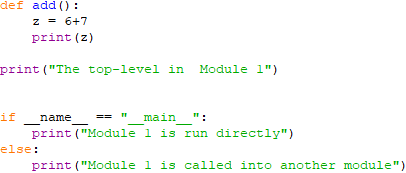
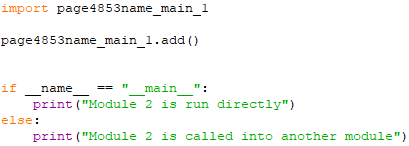
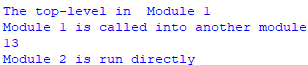
================================================================================= In Python, "if __name__ == '__main__':" is a common construct used to control the execution of code when the script is run as the main program versus when it is imported as a module into another script. __name__ is a special built-in variable in Python. When the Python interpreter runs a script, __name__ is set to '__main__' if the script is being run directly as the main program. If the script is being imported as a module into another script, __name__ is set to the name of the script/module. Therefore, "if __name__ == '__main__':" allows us to define a block of code that will only execute when the script is run directly, not when it's imported as a module. ============================================ __name__ belongs to the list of attributes in dir() (code). Code 1: The if-statement is used to run blocks of code only if the program is the main program executed. This allows the program to be executable by itself, but friendly to other Python modules who may want to import some functionality without having to run the entire code, e.g. the block under if __name__ == "__main__" from the script does not execute. When the script was executed directly, the __name__ keyword is assigned to __main__, and the block of code under the if __name__ == "__main__" condition is executed. This behaviour comes in handy for quick developing and testing the code. It also helps in debugging since it allows to have a script mode where the script can be run as unit tests directly. Otherwise, it’s elegant that running a module in Python directly is just setting up a single variable. The following shows the outputs when the two scripts run: Code 1 and Code 2: Code 1: ============================================ Open an app as the most front window: code: ==================================================== Monitor and display any events in a folder in a very simple format: code: if __name__ == '__main__': code: ============================================ if __name__ == '__main__': code: ============================================ if __name__ == '__main__': code: ============================================ if __name__ == '__main__': code: ============================================ if __name__ == '__main__': code: ============================================ if __name__ == '__main__': code: ============================================ if __name__ == '__main__': code: ============================================ Sometimes, creating plots in the main thread can be used for avoiding warnings during script execution (see page3510). For instance, if you're using Matplotlib to create plots in a multi-threaded environment, ensure that the code to create and interact with plots is executed in the main thread. This might involve using techniques like queuing plot creation tasks to the main thread if they're generated in worker threads. To create plots in the main thread, we can generate and interact with graphical elements (such as the plots) within the primary execution context of the program. This is typically the thread where the main application logic runs, for instance Code:
|
||||||||
| ================================================================================= | ||||||||
|
|
||||||||