=================================================================================
A class is a piece of code from which you can generate a unique object, where each object is a single instance of the class. You create your own classes like you create your own functions. You are free to name the class whatever you want, so long as it’s a legitimate name that starts with a letter and contains no spaces or punctuation. It’s customary to start a class name with an uppercase letter to help distinguish classes from variables. All you need is the word class followed by a space, a class name of your choosing, and a colon.
Class --
Class is a set or category of things having some property or attribute in common and differentiated from others by kind, type, or quality.
In technical terms we can say that class is a blue print for individual objects with exact behaviour.
Object --
object is one of instances of the class. which can perform the functionalities which are defined in the class.
self --
self represents the instance of the class. By using the "self" keyword we can access the attributes and methods of the class in python.
__init__ -- "__init__" is a reseved method in python classes. It is known as a constructor in object oriented concepts. This method called when an object is created from the class and it allow the class to initialize the attributes of a class.
class Car(object):
def __init__(self, model, color, company, speed_limit):
self.color = color
self.company = company
self.speed_limit = speed_limit
self.model = model
maruthi_suzuki = Car("Toyota", "black", "Corola", 60)
When you create a class, you specify the attributes(data) and methods (functions) that objects of that class will have.
Attributes are defined as variables within the class, and methods are defined as functions.
For example,you can design a "Car" class with attributes such as "color" and "speed," along with methods like "accelerate."
Some examples of classes are: code1, code2. code3. code4. code5. code6. code7. (code).
In Python programming, classes are used quite frequently, particularly in situations where object-oriented programming (OOP) is beneficial. Here are some of the common scenarios where Python classes are widely used: - Complex Systems: When building complex systems that require the organization of large amounts of data and functions, classes help to encapsulate data and functionalities into objects. This makes the code more modular, reusable, and easier to understand and manage.
- Software Development: In many areas of software development, including web development, game development, and desktop applications, classes provide a way to create a blueprint for objects that share a common set of attributes and behaviors. This is essential for scaling projects and maintaining code.
- Frameworks and Libraries: Many popular Python frameworks and libraries use classes extensively. For example, Django (a web framework) uses classes for models, views, and forms. Similarly, pandas (a data analysis library) uses classes for its main data structures, DataFrame and Series.
- GUI Applications: Classes are often used in the development of graphical user interfaces (GUIs), where each component of the interface (like buttons, windows, and input fields) can be represented as objects.
- Inheritance and Polymorphism: Python supports object-oriented principles like inheritance and polymorphism, which are implemented using classes. These features are crucial for writing well-organized and efficient code.
- Resource Management: Classes can also be useful in managing resources, such as file streams or network connections, using special methods like __init__ for initialization and __del__ for cleanup.
- Data Science and Machine Learning: In these fields, classes are often used to define models and experiments, encapsulating the parameters, model state, and methods for training and prediction within an object.
==============================================
Use of class: code:

Output:

============================================
Global Access to the local variable with "global": Code:

Output:

==============================================
Application of Class: code:

==============================================
Application of Class: code:

==============================================
Application of Class: code:

==============================================
Application of Class: code:

==============================================
Escape characters: code:

Output:

============================================
Single options: code:

Output 1:
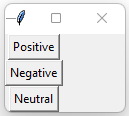
Output 2:
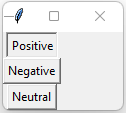

Output 3:
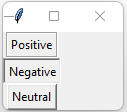

Output 4:
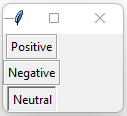

==============================================
Call a function, in a class in a Python script, from another script: code 1 and code 2:
Code 1:
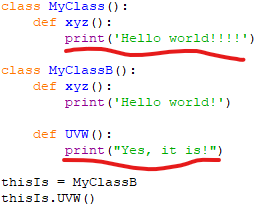
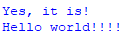
Output after running Code 1:

Code 2:
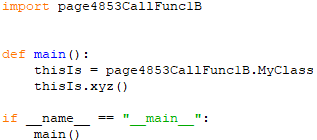
Output after running Code 2:
==============================================
Rectangle Geometry Manager: code:

Output:

Its output is <__main__.Rectangle object at 0x0000018E7451F9D0>. This representation includes the module name (__main__ because the class definition is in the main module), the class name (Rectangle), and the memory address where the object is stored (e.g., 0x0000018E7451F9D0).
After the execution of the given code, the values for the length and width attributes of the instance R1 of the Rectangle class are as follows: - length: The length of R1 is initially set to 5 when the instance is created. Then, the statement R1.length = 10 directly changes the length to 10.
- width: The width of R1 remains unchanged from its initial value of 7, as there is no operation affecting the width attribute in the provided code.
In this script, we have: Class Definition class Rectangle(object):
This line defines a new class named Rectangle, which inherits from the base object class in Python. This is a common practice in Python 2 for ensuring new-style class behavior, but it's optional in Python 3.
Method to Add to Width
def add_width(self, w):
self.width = self.width + w
return self.width
Similar to add_length, this method adds a specified value w to the current width of the rectangle, updates the width attribute, and returns the new width.
Creating an Instance R1 = Rectangle(5, 7, 'green')
This line creates an instance of the Rectangle class named R1. The __init__ method is invoked with the arguments length=5, width=7, and color='green'. This sets up R1 with these initial values:
- R1.length is set to 5.
- R1.width is set to 7.
- R1.color is set to green.
-
Execution Flow:
- When the program runs, it first defines the Rectangle class with all its methods.
- Then, it creates an instance R1 with specific values for length, width, and color.
- At this point, R1 is ready to use, and you can call its methods like R1.add_length(3) to increase the length by 3 units or R1.add_width(2) to increase the width by 2 units.
==============================================
|
