In Python, there are multiple ways to drop rows from a DataFrame:
Using df = df.iloc[1:]:
Advantages:
a) Simplicity and Conciseness:
The syntax is concise and easy to understand. It directly specifies to keep all rows starting from index 1, effectively dropping the first row.
b) In-Place Operation:
Modifies the DataFrame in-place, which can be advantageous if we don't need to keep the original DataFrame.
Disadvantages:
a) Index Dependency:
It relies on the numeric index of rows. If the DataFrame has a custom index or non-sequential numeric index, using iloc might not be as intuitive.
b) Potential Confusion:
If the DataFrame has a non-standard index, using iloc[1:] might not be immediately clear to someone reading the code, as it's index-dependent.
c) Risk of Empty DataFrame:
If the DataFrame has only one row, using df.iloc[1:] will result in an empty DataFrame. It's essential to ensure that there is more than one row before using this approach.
d) Not Suitable for Label-Based Indexing:
If we want to drop rows based on labels instead of index positions, using iloc is not the appropriate method. -
Using df.drop(index):
df = df.drop(0)
This will drop the row with the specified index (in this example above, index 0).
Advantages:
Explicitly specifies the index of the row to be dropped.
Disadvantages:
Requires knowledge of the index of the row to be dropped. -
Using df.drop(labels):
df = df.drop(df.index[0])
This will drop the row with the specified label (in this example above, the label of the first row).
Advantages:
Can use labels (code below) rather than index values. More flexible if rows are not sequentially indexed.

Output: 
Disadvantages:
Requires specifying the label or labels of the rows to be dropped. -
Using .duplicated():
Determines which elements of a vector, series or data frame are duplicates of elements with smaller subscripts, and returns a logical (boolean) vector indicating which elements (rows) are duplicates. While .duplicated() itself doesn't drop rows, it can be combined with other methods to achieve the goal of dropping duplicate rows (code):

Output:

In this example above, df.duplicated() is used to identify duplicate rows, and then ~df.duplicated() is used to create a boolean mask that selects non-duplicate rows. The resulting DataFrame (df_no_duplicates) contains only the non-duplicate rows. -
Using boolean indexing (df[condition]):
Code example:

Output:

================================================
Basics of duplicated and drop_duplicates (.set_option(): Set the value of a single option): code:
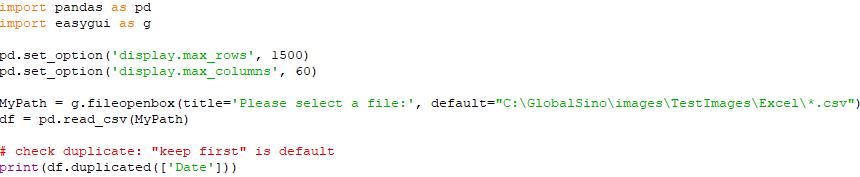
Input:

Output:

Code:

Output:

Code:

Output:

Code:

Output:

=====================
Basics of duplicated and drop_duplicates: code:

Output:

================================================
Remove rows which contains a duplicated cell in a csv file (but it keeps the first row in the stored file): code:

Input:

Output:

================================================
Remove rows which are fully duplicated rows in a csv file (with only one of the fully duplicated rows left in the new data set): but keep the first one: code:

Input:

Output:

================================================
Remove duplicates by using drop_duplicates: code:

Input:

Output:

================================================
Different variables in drop_duplicates : code:

Input:

Output:

================================================
Remove duplicates by using drop_duplicates: code:
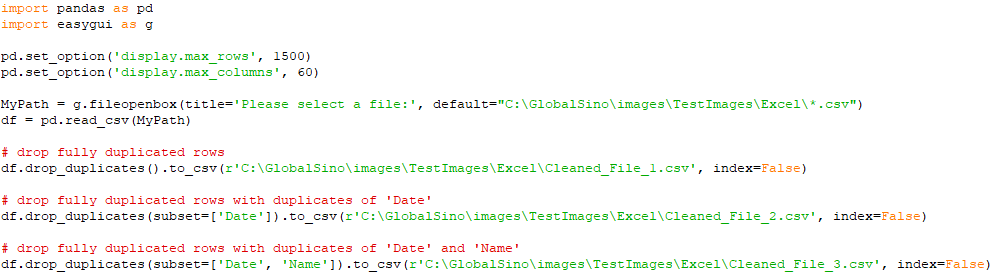
================================================
Drop all duplicates : code:

Input:
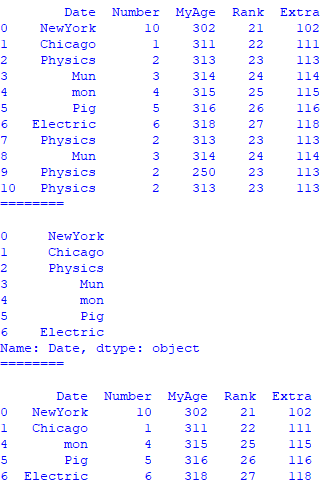
|
