|
||||||||
|
||||||||
.apply(pd.Series) - Python Automation and Machine Learning for ICs - - An Online Book: Python Automation and Machine Learning for ICs by Yougui Liao - |
||||||||
| Python Automation and Machine Learning for ICs http://www.globalsino.com/ICs/ | ||||||||
| Chapter/Index: Introduction | A | B | C | D | E | F | G | H | I | J | K | L | M | N | O | P | Q | R | S | T | U | V | W | X | Y | Z | Appendix | ||||||||
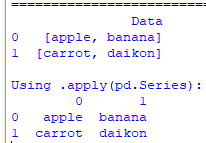
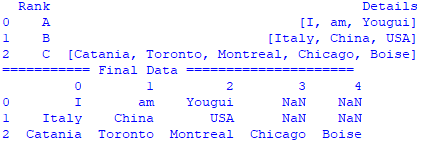
================================================================================= This command, .apply(pd.Series), is used to transform each element of a DataFrame or Series into a new DataFrame where each element is expanded into its constituent components in new columns. When .apply(pd.Series) is used, each input element is expected to be a list-like or dictionary object that pandas can expand into multiple columns in a new DataFrame. It’s commonly used when you have a Series or a single column of a DataFrame where each entry itself can be expanded into multiple data points. For example, if a column contains lists or dictionaries, you can use .apply(pd.Series) to convert each list or dictionary into separate columns in the DataFrame. =========================================== Using .apply(pd.Series) to expand the lists into separate columns. Code: ==================================================== Split a list into multiple columns with "pd.Series": code:
|
||||||||
| ================================================================================= | ||||||||
|
|
||||||||