| A cache is a high-speed data storage layer that temporarily holds frequently accessed information, allowing it to be retrieved more quickly than from the primary storage location. In computing, caches are used across various levels of a system to improve performance and efficiency. In other words, caches are small, high-speed memory storage areas within a processor or between the processor and main memory (RAM) that store frequently accessed data temporarily. Caches use SRAM (Static RAM) because it is faster than DRAM (Dynamic RAM), though more expensive and less dense. SRAM is optimized for quick access, which is critical for caches to maintain the processor’s performance. The primary types of caches are:
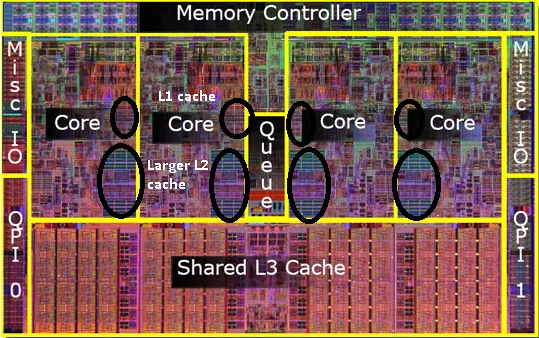
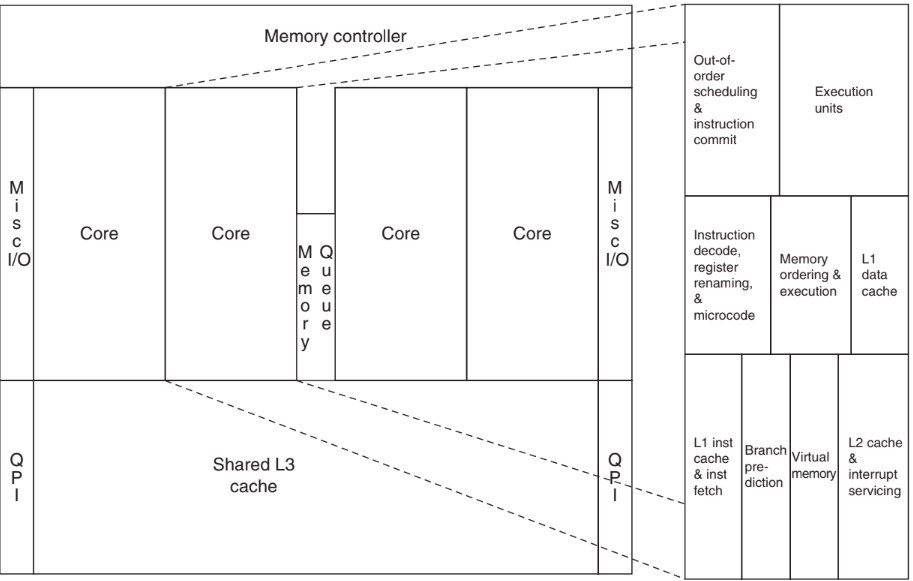
- CPU Cache (see Figure 0154): This is the fastest type of cache, located directly on or near the CPU. It's divided into multiple levels (L1, L2, and sometimes L3), each with varying sizes and speeds. The CPU cache stores frequently accessed data and instructions, so the CPU doesn’t have to fetch them from the slower main memory (RAM).
- L1 Cache (Level 1):
- The fastest and smallest cache, located directly within each CPU core.
- Typically split into two parts: one for instructions (instruction cache) and one for data (data cache).
- Reduces latency by storing the most frequently used data close to the core.
- L2 Cache (Level 2):
- Larger than L1 but slower and shared by multiple cores or exclusively within each core.
- Stores data not in L1 cache but still frequently accessed by the core.
- In processors like the Apple A16, it can store 4 MB or 16 MB depending on core type.
- L3 Cache (Level 3):
- Even larger and slower than L2, often shared across all CPU cores.
- Stores data that is frequently accessed but not as critical as L1 or L2 data.
- Some processors, like the Apple A16, may replace this with a System Level Cache (SLC), which serves a similar purpose.
- System Level Cache (SLC):
- Used in SoCs (System on Chips) to provide a shared cache for the CPU, GPU, and other components.
- Enhances performance by reducing latency across different parts of the chip, especially when data needs to be shared between components.
Figure 0154. (a) Photograph of an Intel Core i7 microprocessor die with L1, L2 and L3 cache in a four core processor, and (b) . The L1 (2 to 64 KB Level 1 cache) is a very high speed cache; the L2 (~256 KB Level 2 cache) is a medium speed cache;
all cores share a Level 3 (L3) cache, which tends to be around 8 MB. The dimensions are 18.9 mm by 13.6 mm (257 mm2) in a 45 nm process. (Courtesy Intel.), and (b) Floorplan of Core i7 die, on left with close-up of floorplan of second core on right. [1]
|
- Disk Cache: Hard drives and SSDs often use a cache to speed up data access. It keeps a copy of recently or frequently accessed files, so the storage device can serve data faster. This type of caching reduces read and write times for storage devices.
- Web Cache: Used by browsers and web servers, a web cache stores previously accessed web content locally or on a network. This allows browsers to quickly load web pages without repeatedly fetching the same content from the internet.
- Memory Cache (RAM Cache): Many applications use a portion of the system’s RAM to store frequently used data, speeding up access and improving the overall performance of software applications.
- Database Cache: Databases cache data in memory to reduce the time needed to access frequently requested information. This is especially beneficial in handling high-traffic situations where database query speed is critical.
[1] https://superuser.com/questions/196143/where-exactly-l1-l2-and-l3-caches-located-in-computer.
|